SkyFeel watches the air pressure where you live, gives you a heads-up before sharp drops, and helps you see whether your harder days follow a pattern.
Coming soon to iPhone and iPad
iPhone and iPadNo account needed
App screens show example data.
SkyFeel8:00 PM
Tomorrow: sharp pressure drop from about 2 PM (−0.19 inHg).
Weather sensitivity
Some days just feel different.
A heavy head before the rain. Knees that ache when a front moves in. A tiredness you can’t explain. And sooner or later, someone says it’s all in your head.
SkyFeel can’t tell you why you feel the way you do. It gives you something better than guesswork: the pressure forecast for your town, side by side with your own notes.
More than half
of 1,207 people with migraine named the weather as a trigger in one study.
Five or six bad days a month add up to about 66 days a year.
That’s all of January, February and the first week of March.
7-day pressure forecast
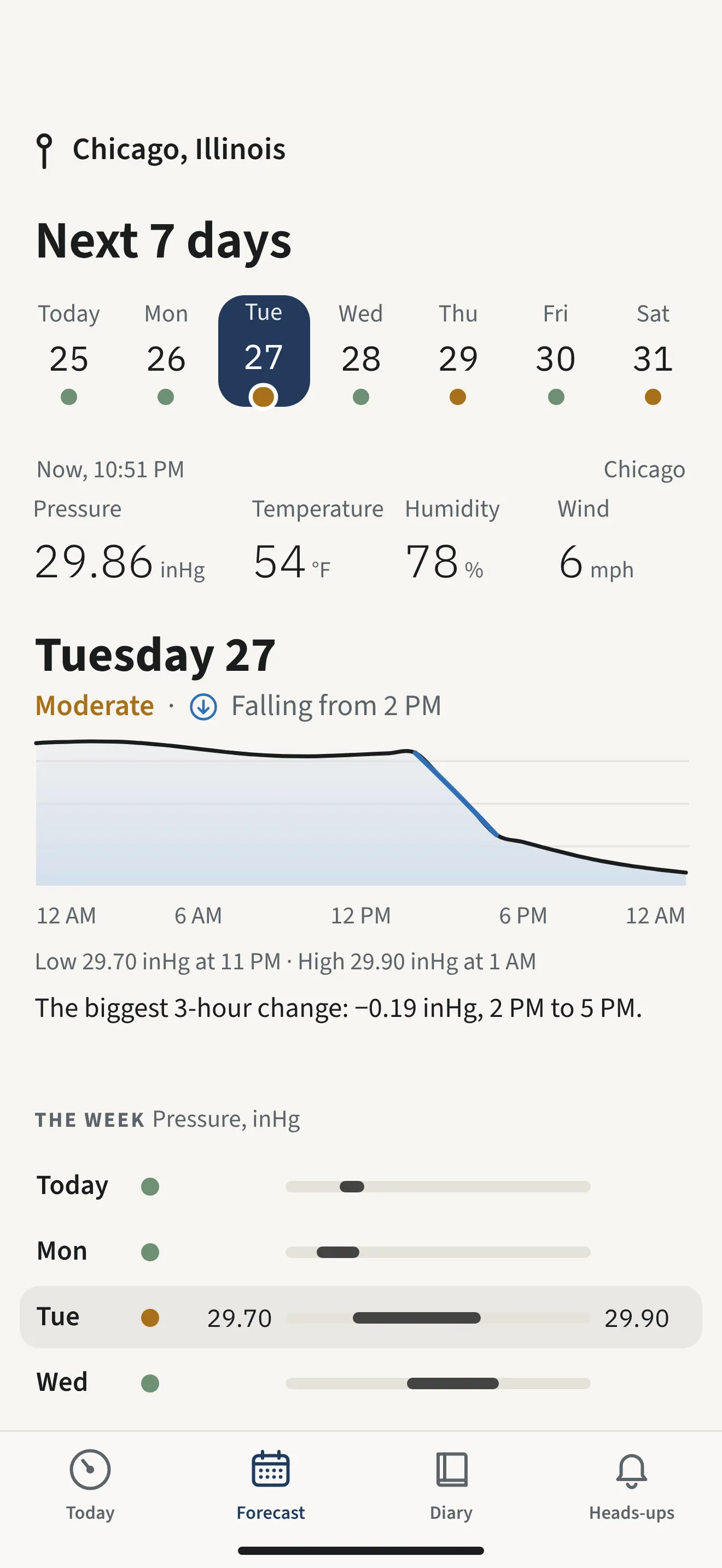
See the week ahead, in pressure.
Check how the air pressure will move where you are over the next seven days. Calm days and sharp drops are marked at a glance, so a busy Tuesday doesn’t catch you off guard.
Low, moderate or high at a glance, for every day
An hour-by-hour pressure curve for the day you pick
inHg, hPa or mmHg. °F or °C.
Heads-ups
A heads-up before the pressure drops.
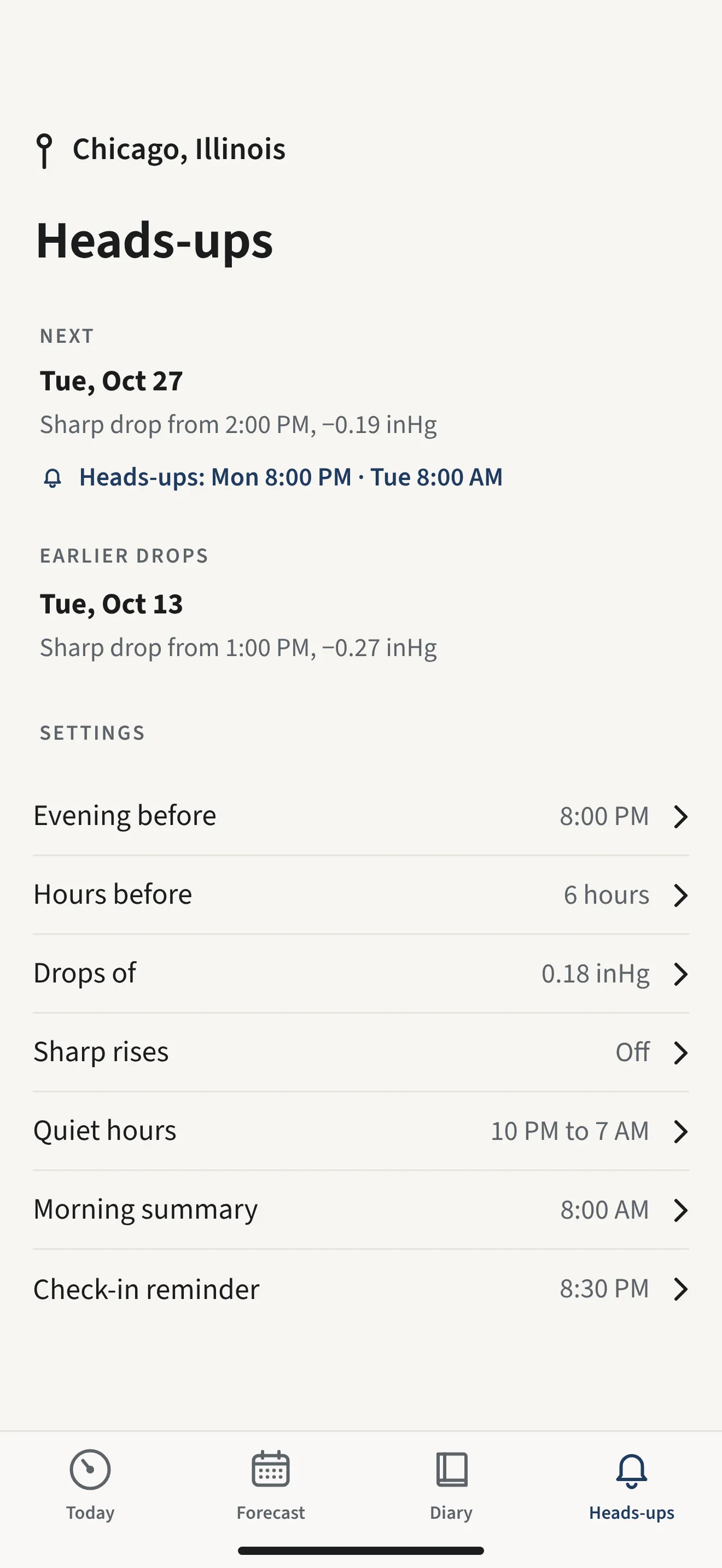
When a sharp drop is on its way, SkyFeel tells you the evening before and again a few hours before it starts. Enough time to move a meeting, keep your evening light, or simply know what’s coming.
The evening before at 8 PM
6 hours before the drop begins
At most two heads-ups per drop, plus an update if it changes and an all-clear if it’s called off
Never at night between 10 PM and 7 AM
You decide what counts as a sharp drop
0.12 inHg 0.18 inHgDefault0.24 inHg 0.30 inHg
Default: 0.18 inHg (about 6 hPa) within 12 hours. A lower number means more heads-ups, a higher one fewer.
SkyFeel8:00 PM
Tomorrow: sharp pressure drop from about 2 PM (−0.19 inHg).
Daily check-in
One tap a day. A clearer picture over time.
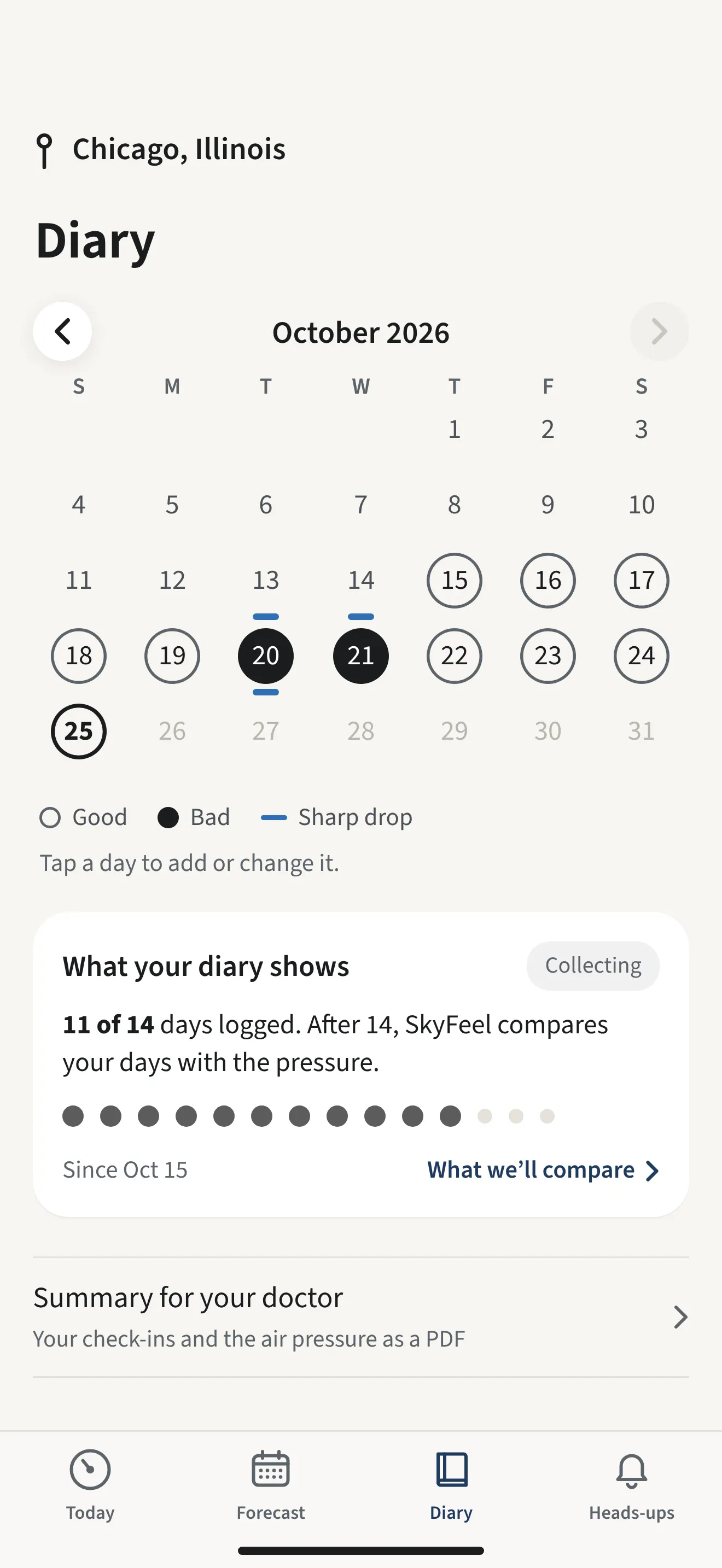
How was today? Tap it. Add symptoms or medication if you want to, skip it if you don’t. SkyFeel marks the sharp drops on the same calendar, so your days and the pressure sit side by side.
Takes a few seconds
A gentle evening reminder, if you want one
Your entries are stored on your phone
Your patterns
Stop guessing. Start noticing.
Once you’ve logged 14 days, SkyFeel compares your harder days with what the pressure was doing where you were. Give it 8 to 12 weeks and the picture usually becomes much clearer.
Day 1Your first check-in
Day 14SkyFeel starts comparing
Weeks 8–12Usually a clearer picture
A pattern is a clue, not a diagnosis. It shows that two things happened together, not that one caused the other. It can be a useful starting point for a conversation with your doctor.
Example of what you might see
5 of 7
of your bad days fell on a day with a sharp pressure drop, or the day after.
MTWTFSS
Bad daySharp drop
Heads-ups with memory
A heads-up that remembers.
When a sharp drop is coming, SkyFeel can remind you what you logged the last time the pressure fell like this. Your own history, right when it’s useful.
SkyFeel8:00 PM
Tomorrow from about 2 PM: sharp pressure drop (−0.19 inHg). Last time a drop like this came, on Oct 13, you logged a bad day.
It reminds you of your own notes. It doesn’t predict how you’ll feel.
How it works
Three small steps.
01
Check the forecast
See how the pressure will move over the next seven days where you live.
02
Tap how you feel
One tap a day. Add details only if you want to.
03
See your patterns
After a few weeks, find out whether your harder days have something in common.
Built around your day
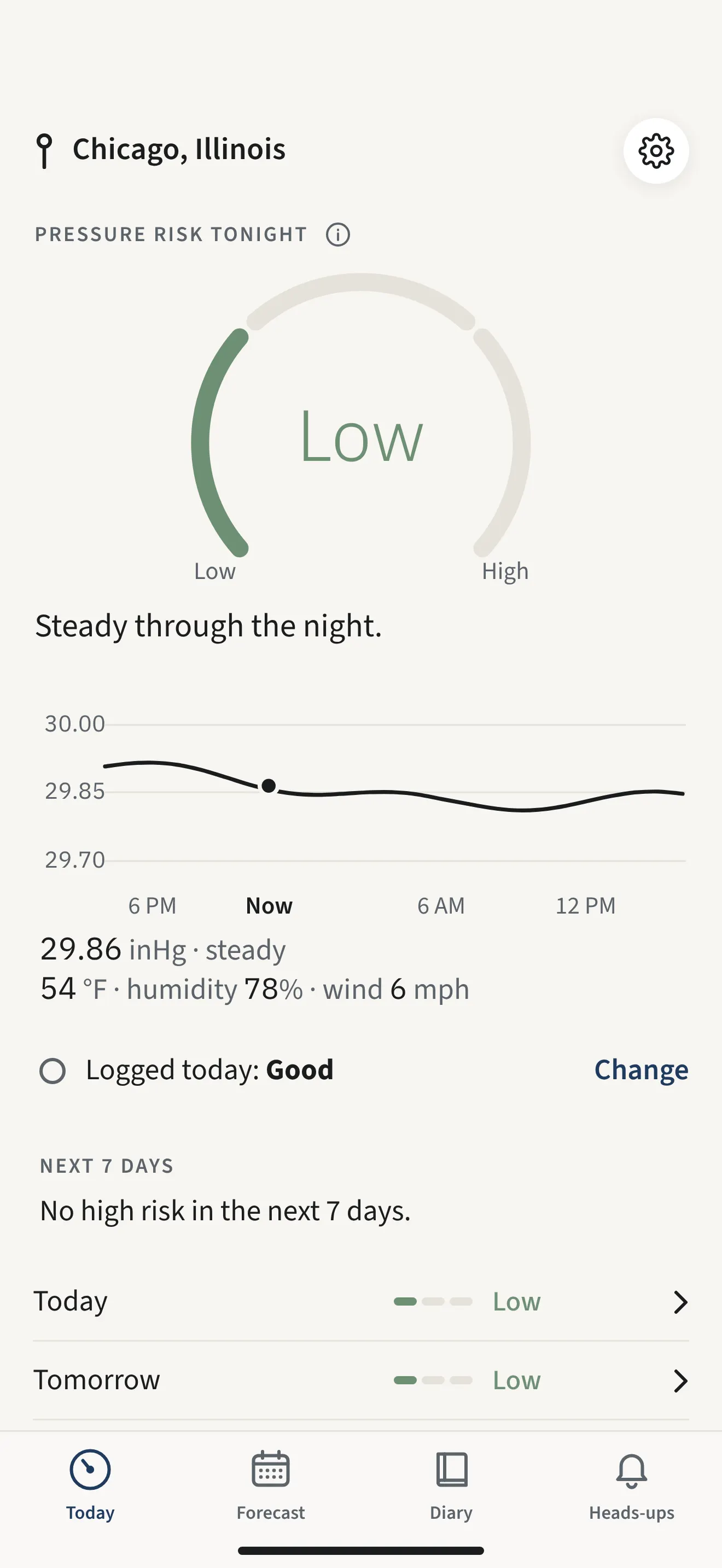
There when you glance at your phone.
Chicago
29.86inHg
No sharp drop in the next 48 hours
Pressure risk tonight
Low
Chicago
Pressure risk tonight
Low
29.86 inHg
TomorrowLow
TuesdayModerate
WednesdayLow
Widgets for the home and lock screen
The pressure, tonight’s pressure risk and the days ahead, without opening the app.
Your own threshold
Decide how big a drop has to be before you hear about it.
A summary for your doctor
Export your check-ins and the air pressure as a PDF to bring to an appointment.
Your check-ins, symptoms and medication notes are kept on your phone, not on our servers.
Never used for ads
We don’t share your diary entries with advertisers.
Only an approximate area
For the forecast, SkyFeel sends an area of about 20 km to our own server, never your exact location.
SkyFeel Pro
All of SkyFeel, with SkyFeel Pro.
SkyFeel Pro
Yearly or monthly. You buy and manage it in the app through the App Store, and the price is shown there before you buy.
The 7-day pressure forecast and the map
Heads-ups the evening before and hours before a sharp drop
Your own threshold for a sharp drop
The one-tap diary and your own pattern
A summary for your doctor
Widgets for the home screen and the lock screen
Coming soon to iPhone and iPad
iPhone and iPadNo account needed
FAQ
Good questions.
What is barometric pressure?
It’s the weight of the air above you. When a low-pressure system moves in, the pressure falls; when it clears, it rises again. In the US it’s usually given in inches of mercury (inHg); most other countries use hectopascals (hPa).
Can changes in air pressure affect how people feel?
Many people report headaches, joint pain, tiredness or poor sleep around weather changes, and some studies have found links for some people. The research isn’t settled, and it varies a lot from person to person. That’s why SkyFeel focuses on your own observations.
Does SkyFeel predict migraines or headaches?
No. SkyFeel forecasts barometric pressure, not symptoms. It tells you when the pressure is expected to drop sharply and helps you compare that with how you felt. It can’t tell you whether you’ll get a headache.
How do heads-ups work?
When the forecast shows a sharp drop (by default 0.18 inHg, about 6 hPa, within 12 hours), SkyFeel notifies you the evening before at 8 PM and again 6 hours before the drop begins. You get at most two heads-ups per drop, plus an update if it changes and an all-clear if it is called off, and none between 10 PM and 7 AM.
Can I change how sensitive the heads-ups are?
Yes. Choose 0.12, 0.18, 0.24 or 0.30 inHg. A lower number means more heads-ups, a higher one fewer. You can also change the time of the evening heads-up and how many hours before a drop the second one arrives.
Is SkyFeel free?
No. SkyFeel is free to download, but to use it you need SkyFeel Pro, a yearly or monthly subscription. You buy and manage it in the app through the App Store, and the price is shown there before you buy.
How long until I see my own patterns?
SkyFeel starts comparing your days with the pressure after 14 check-ins. For a clearer picture, most people need 8 to 12 weeks of regular check-ins, depending on how many sharp drops happen in that time.
Is my health diary private?
Your check-ins, symptoms and medication notes are stored on your phone, and we don’t share them with advertisers. To show the forecast, SkyFeel sends only an approximate area (about 20 km) to our own server, never your exact location. Like most apps, SkyFeel also uses some third-party services, for example Meta’s tools to measure our ads. The Privacy Policy explains exactly what is processed.
Do I need an account?
No. Open the app and start. There is no sign-up and no password.
Does SkyFeel work on iPhone and Android?
SkyFeel is available for iPhone and iPad. It is not available for Android yet.
Where does the weather data come from?
SkyFeel uses forecast data from Open-Meteo.com.
Is SkyFeel a medical app?
No. SkyFeel is not a medical device and does not diagnose, treat, prevent or predict any condition. It helps you keep track of the weather and your own observations. If you have health concerns, please talk to a doctor.
So the next weather change doesn’t catch you off guard.
Download SkyFeel and see the next pressure drop coming.